
Bazaar and Exchange
Bazaar
Sell your belongings to other users. Use it to make money out of rare items you have discovered or trade goods you have produced. It is also a good way to collect materials.
Opening a Bazaar
- Click
 and select 'Bazaar'.
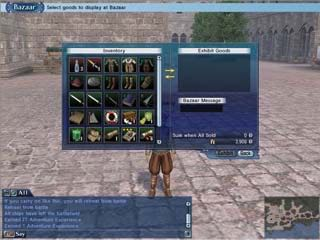
 - The Bazaar window will appear. Your belongings and items for sale at your bazaar will be marked.
- Click on the item you would like to sell from your belongings inventory.
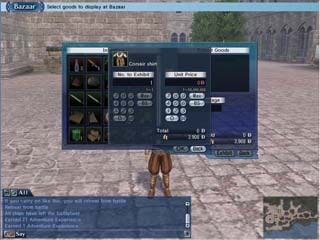
- Select the number of items and price. Then click 'exhibit'.

- Users with an active Bazaar will have a
 mark next to their character.
When the Bazaar is open the Bazaar mark will appear.
Purchasing from another user

- Click on a user with a
 mark.
mark. - A window will appear. Click on
 .
.
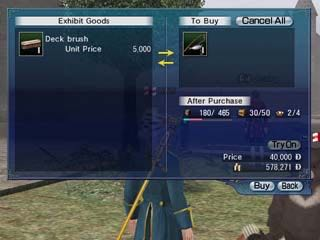
- Another window will pop up. This is the list of items for sale at this Bazaar.
- Select the item you would like to purchase from the list.
- Enter the number of items, check the price, and then click 'purchase'. The exchange will be completed automatically.
Exchange
This allows you to exchange goods with other users. It is useful if you want to exchange or hand over an item.
Exchange

- Click on the player you would like to exchange with.
Chat with the user in advance to determine what will be exchanged. Exchange is not possible between users with different language skills.

- A window will appear. Click on
 .
.
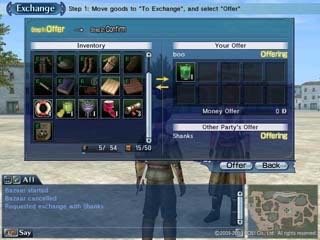
- If the opposite user receives the exchange message, a window will appear. Click on the item you would like to exchange.
- Remember to enter 'quantity' if the item is trade goods or a stackable item.
- Click 'offer'.

- When the opposite user makes an offer, items from both sides will appear in the window.
- Carefully review the exchange goods and click 'confirm'. When both parties select 'confirm' the exchange will be accomplished.
Company shop
If you are part of a company you can go to the Company Administration Officer to register up to three items for sale in exchange for commission.
If your company is seized, the same will go to the items you have registered at the company shop.